
How to Program Variable Speed Pool Pump - Complete Guide

How do I actually set up my variable speed pump programming?
Read full question
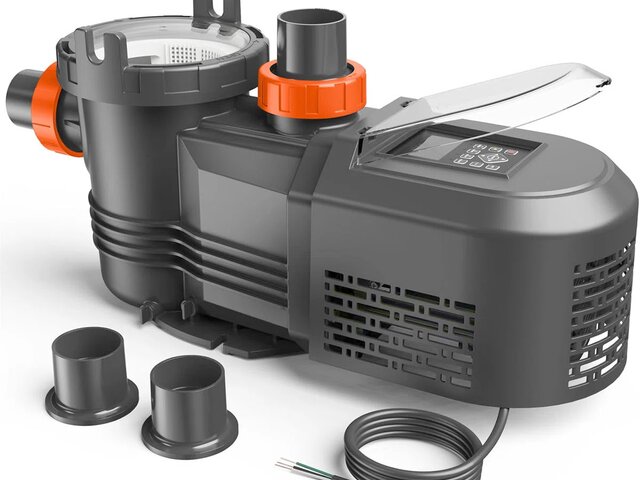
Nobody warned me that after the pool guy installed my new variable speed pump yesterday, I'd be staring at this digital display like it's speaking ancient Greek. The installer basically ran off after hooking it up and now I'm supposed to figure out how to program different speeds throughout the day.
I get that I'm supposed to run it at different RPMs at different times to save energy, but honestly have no clue where to start. Like, what speeds should I use and when? And how do I actually punch this stuff into the control panel? My old single-speed pump was so much simpler - just flip the switch and forget about it!
Quick Answer
Programming a variable speed pool pump involves setting different RPM speeds for specific time periods throughout the day to optimize filtration while minimizing energy costs, with typical savings of about 50-80% compared to single-speed operation (manufacturers cite up to 90% as a best-case ceiling). Most pumps use a digital interface with up to 8 programmable schedules.
Understanding Variable Speed Pump Programming
Variable speed pumps use permanent magnet motors that can operate at different RPM (revolutions per minute) levels, typically ranging from 600 RPM to 3,450 RPM. The key to effective programming is matching your pump speed to your pool's filtration needs while minimizing energy consumption. Lower speeds move less water but use significantly less electricity - the relationship follows the affinity laws where power consumption rises with the cube of speed (half the speed uses roughly one-eighth the power).
Basic Programming Steps
- Access the Control Panel: Locate the digital display on your pump. Most Pentair, Hayward, and Jandy variable speed pumps have LCD screens and navigation buttons, though programming procedures vary by manufacturer - consult your specific pump manual for exact button sequences.
- Enter Programming Mode: Press and hold the "Program" or "Menu" button (typically 2-10 seconds depending on manufacturer) until the display shows programming options. Some models require pressing multiple buttons simultaneously.
- Select Program Number: Most pumps offer up to 8 programmable time periods. Use the arrow keys to select Program 1, then set your desired start time using the hour and minute buttons.
- Set RPM Speed: Choose your desired speed for this time period. For basic filtration, 1,200-1,500 RPM is often sufficient. For skimming and light circulation, 800-1,000 RPM works well.
- Set Duration: Specify how long this speed should run. Consider your turnover rate - most pools need 8-12 hours of circulation daily.
- Repeat for Additional Programs: Set up additional time periods with different speeds. A typical schedule might include low speed overnight, medium speed during the day, and higher speed for cleaning cycles.
- Save Settings: Press "Save" or "Enter" to confirm each program. The pump will typically beep or flash to confirm the setting is stored.
- Enable Auto Mode: Switch the pump to automatic mode so it follows your programmed schedule instead of manual operation.
Optimal Programming Strategies
Basic Daily Schedule
For most residential pools, an effective programming strategy involves running lower speeds for longer periods rather than high speeds for short bursts. A typical 24-hour schedule might include:
- Overnight (10 PM - 6 AM): 800-1,000 RPM for gentle circulation and chemical distribution
- Morning (6 AM - 10 AM): 1,500-2,000 RPM for active filtration during morning debris removal
- Midday (10 AM - 6 PM): 1,200-1,500 RPM for steady circulation during peak sun hours
- Evening (6 PM - 10 PM): 1,800-2,200 RPM for higher circulation during swim time and debris filtering
Seasonal Adjustments
Your programming should adapt to seasonal conditions. During summer months with heavy use, algae growth potential, and more debris, increase overall circulation times and speeds. In winter, you can reduce circulation significantly, potentially running only 4-6 hours daily at lower speeds if the pool isn't used regularly.
Calculating Proper Flow Rates
To determine appropriate RPM settings, calculate your pool's turnover rate. Most pools should complete 1-2 full turnovers daily. For a 20,000-gallon pool, you need to circulate 833 gallons per hour for a 24-hour turnover, or 1,667 GPH for 12-hour turnover. Check your pump's performance curve to match GPH to RPM - typically 1,500 RPM provides 40-60 GPM, while 2,400 RPM might provide 80-100 GPM, depending on your system's head pressure.
Advanced Programming Features
Priming Mode
Most variable speed pumps include a priming function that runs at high speed initially to establish water flow, then automatically reduces to programmed speeds. Enable this feature if your pump regularly loses prime.
Manual Override
Maintain the ability to manually override your programming for special situations like vacuuming, shocking, or after heavy storms. Most pumps allow temporary manual operation without losing programmed settings.
External Controls Integration
If you have a pool automation system from manufacturers like Pentair, Hayward, or Jandy, integrate your variable speed pump programming with other equipment like heaters, chlorinators, and lighting for coordinated operation.
Common Programming Mistakes to Avoid
- Running Too High Speeds Constantly: This negates energy savings and can cause excessive wear on equipment
- Insufficient Circulation Time: Even at lower speeds, ensure total daily circulation meets your pool's turnover requirements
- Ignoring System Head Pressure: High head pressure from dirty filters or closed valves reduces flow at any RPM setting
- Not Adjusting for Pool Usage: Increase circulation during heavy use periods and when adding chemicals
- Forgetting Heater Requirements: Gas heaters require a minimum flow rate to fire safely (typically about 20-40 GPM, depending on model — check your heater's manual)
Maintenance and Monitoring
After programming, monitor your pool's water clarity and circulation effectiveness. Clean skimmer and pump baskets regularly, as restrictions reduce flow efficiency at any speed. Check your pool's chemical balance more frequently initially to ensure your new circulation pattern maintains proper distribution. Most variable speed pumps display current power consumption - use this to track energy savings compared to single-speed operation.
Remember that effective programming balances energy efficiency with proper pool maintenance. Start with conservative settings and adjust based on your pool's response, weather conditions, and usage patterns. Most pool owners find they can maintain excellent water quality while reducing energy costs by 50-80% with properly programmed variable speed pumps.
Still need help? Ask a Pool & Spa Expert AD
Get a personalized answer from PoolGuy810 — 30 years owning a pool and spa repair company. Describe your issue and get step-by-step help.
Related Pool Guides
Need More Help?
Try our free pool calculators and tools to help diagnose and fix your pool problems.
Browse Pool ToolsSLAM calculator, pH calculator, salt dosing & more